Getting Started
From the box to your first movement in five steps. Pick your setup once in the tabs below: the choice is remembered across the page.
| You need | |
|---|---|
| A PC with Ubuntu (24.04 recommended) or Windows 11 | x86_64 or aarch64 |
| Internet access and admin rights | for the installation |
| A free, stable table, 30–50 mm thick | for the clamp |
- The arm has no brakes. When the motors are disabled, the power is cut or the emergency stop is pressed, it falls.
- Stopping your program does not stop the motors. They keep executing the last command.
- Keep out of reach of the arm (≈ 0.9 m around the shoulder) while it is powered. The emergency stop is your way to cut power.
1. Set up the hardware
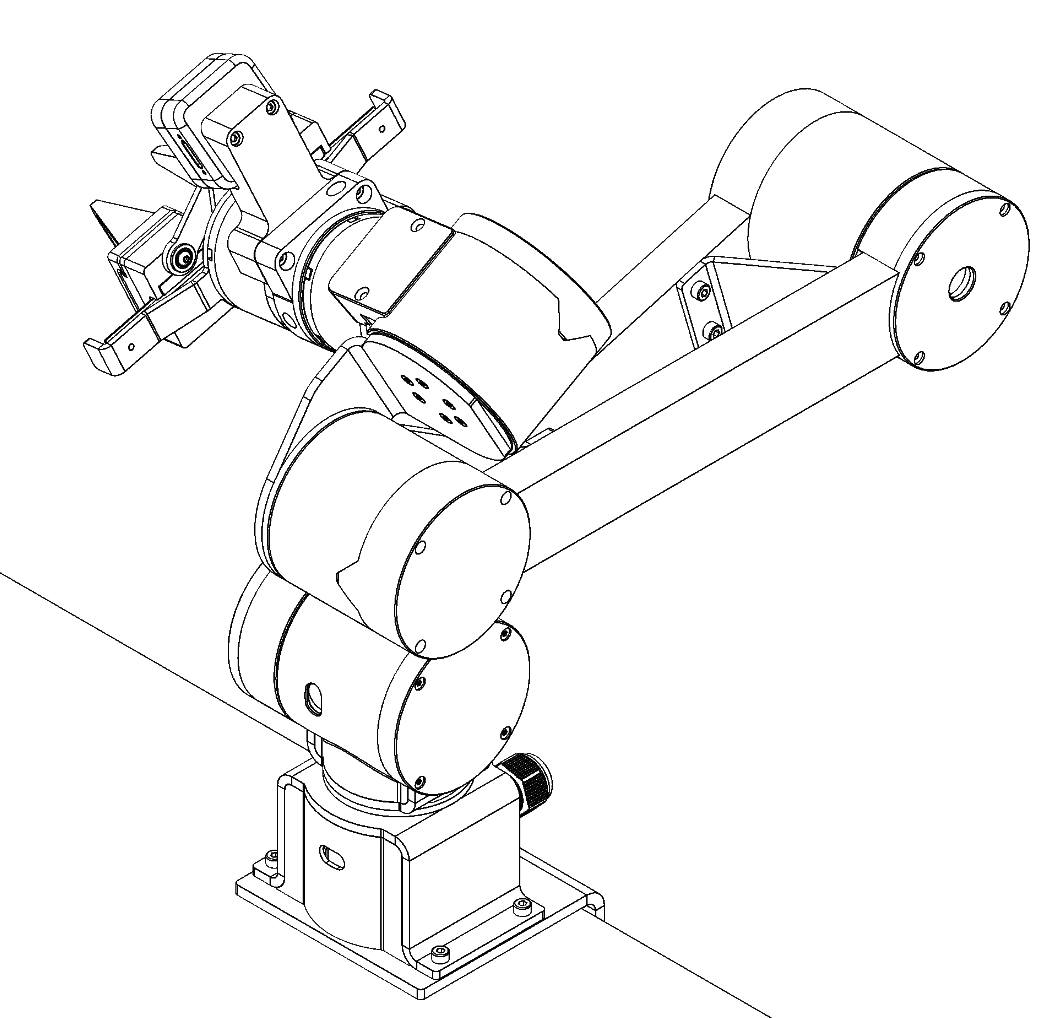
Mount. Clamp the arm on the table, lifting it only by the base and the links (not by the cables or the gripper). Tighten the clamp before letting go, then place the arm in its resting position. Every session starts and ends here.
Wire. With the emergency-stop button pressed, connect in this order:
- robot → Power Box (orange M12 cable, fits one way, screw it in);
- Power Box → PC (USB-C);
- Power Box → mains socket with earth.
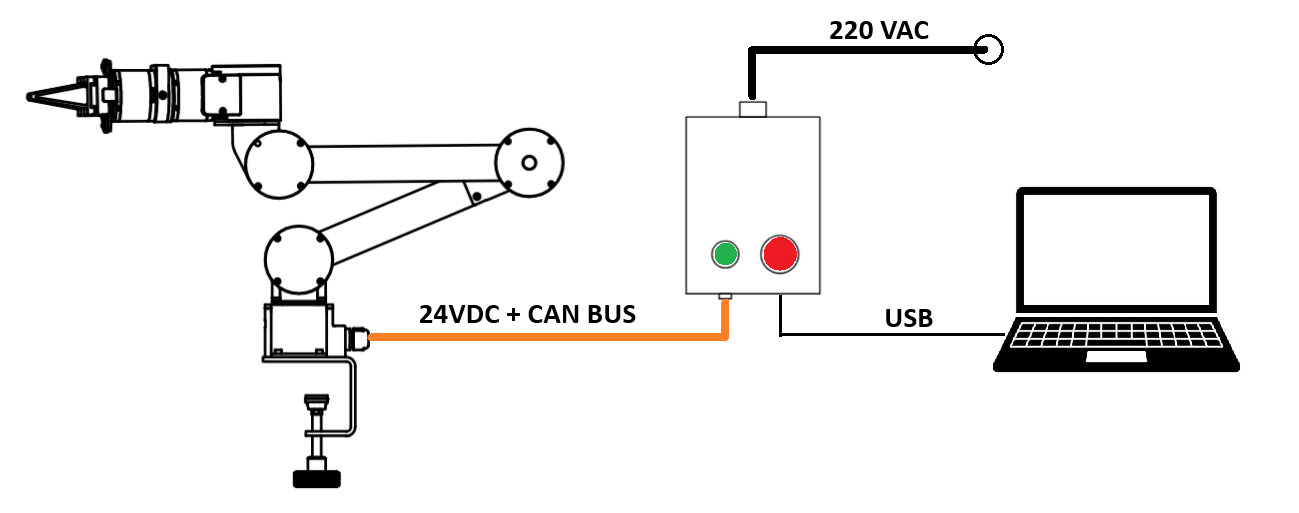
Switch on. Turn the emergency-stop button clockwise to release it, then press the green start button. The button lights up and the motor LEDs turn solid red: the motors are powered but disabled, so the arm does not move yet.
2. Prepare your computer
- Ubuntu
- Windows (WSL2)
Check that the arm's USB port is visible:
ls /dev/ttyACM0
Allow your user to use it (once), then log out and back in:
sudo usermod -aG dialout $USER
On Windows the software runs inside WSL2, a Linux system built into Windows.
All bash commands on this page go into the Ubuntu app, powershell ones into
PowerShell as Administrator.
Install WSL2 and Ubuntu, then open the new Ubuntu app from the Start menu and create a user:
wsl --install Ubuntu-24.04
Install usbipd, which passes the USB port to WSL:
winget install --interactive --exact dorssel.usbipd-win
and the matching tools inside Ubuntu:
sudo apt update
sudo apt install -y linux-tools-virtual hwdata
sudo update-alternatives --install /usr/local/bin/usbip usbip /usr/lib/linux-tools/*/usbip 20
Share the port (once). Reopen PowerShell as Administrator, find the USB Serial Device and note its BUSID:
usbipd list
# BUSID  VID:PID    DEVICE                     STATE
# 1-9    2e88:4603  USB Serial Device (COM3)   Not shared   <-- this one
usbipd bind --busid 1-9
Attach it to WSL. With the Ubuntu app open, run:
usbipd attach --wsl --busid 1-9
Repeat usbipd attach every time you reboot or replug the USB cable.
Finally, inside Ubuntu, check the port and allow your user to use it (once):
ls /dev/ttyACM0
sudo usermod -aG dialout $USER
Then restart WSL so the permission applies: wsl --shutdown in PowerShell, and reopen Ubuntu.
3. Install the API
Not sure which one? Choose Python: one command installs everything.
- Python
- C++
Run as a normal user (not with sudo):
curl -fsSL https://itacarobotics.com/install.sh | bash
It asks for your password once, installs the build tools, a conda environment called ulixenv
(Python 3.10) and ulixpy, then checks that it works. It takes a few minutes; run it again any
time to update.
In every new terminal, activate the environment first:
conda activate ulixenv
If Requires Python ≥ 3.10.conda is not found, open a new terminal or run source ~/.bashrc.Install into your own Python environment instead (pip)
Uninstall
Dependencies: compiler, CMake, Eigen and libserialport:
sudo apt install -y build-essential cmake git pkg-config libeigen3-dev libserialport-dev
Pinocchio (used for gravity compensation), from the robotpkg repository (x86_64):
sudo mkdir -p /etc/apt/keyrings
curl http://robotpkg.openrobots.org/packages/debian/robotpkg.asc | sudo tee /etc/apt/keyrings/robotpkg.asc
echo "deb [arch=amd64 signed-by=/etc/apt/keyrings/robotpkg.asc] http://robotpkg.openrobots.org/packages/debian/pub $(lsb_release -cs) robotpkg" \
  | sudo tee /etc/apt/sources.list.d/robotpkg.list
sudo apt update && sudo apt install -y robotpkg-pinocchio
echo 'export CMAKE_PREFIX_PATH=/opt/openrobots:$CMAKE_PREFIX_PATH' >> ~/.bashrc
echo 'export LD_LIBRARY_PATH=/opt/openrobots/lib:$LD_LIBRARY_PATH' >> ~/.bashrc
source ~/.bashrc
Other options are on the Pinocchio download page.
Build the library and examples:
git clone --recurse-submodules https://github.com/itacarobotics/ulixarm_cpp.git
cd ulixarm_cpp
cmake -S . -B build -DCMAKE_BUILD_TYPE=Release
cmake --build build -j
sudo cmake --install build   # optional: to use it from your own projects
In your own CMake project:
find_package(ulixarm_cpp REQUIRED)
target_link_libraries(my_app PRIVATE ulixarm_cpp::ulixarm_core)
4. First program: move the arm by hand
This runs gravity compensation: the motors cancel the arm's weight, so it floats and you can guide it by hand. It is the safest first test, because it applies no stiffness.
Before running: arm in the resting position, Power Box switched on, nobody near the arm.
- Python
- C++
import numpy as np
from ulixpy import UlixArm

robot = UlixArm(gripper=True)
robot.connect("/dev/ttyACM0")
robot.enable()
robot.refresh()

zero = np.zeros(6)
try:
    while True:
        # kp = kd = 0: no stiffness, only gravity compensation
        robot.control(zero, zero, zero, zero, zero, True)
except KeyboardInterrupt:
    pass
finally:
    robot.hold()          # keep the current pose
    robot.disconnect()
conda activate ulixenv
python gravity.py
More examples are in /opt/itacarobotics/ulixpy/examples.
./build/examples_gravity /dev/ttyACM0
The source is in examples/gravity.cpp.
Press Ctrl+C to stop: the arm holds its current pose.
5. Operate safely
A typical session, every time:
| Step | Why | |
|---|---|---|
| 1 | Arm in resting position, then switch on | enable() gives no holding torque until the first command |
| 2 | connect(), enable(), then hold() or control() right away | the arm is only supported once a command is sent |
| 3 | Move in small steps (≤ 0.2 rad per command) | larger jumps are rejected; interpolate motions |
| 4 | Watch the arm, hand near the emergency stop | there is no collision detection |
| 5 | Bring the arm back to the resting position | it falls when disabled |
| 6 | disable(), then press the emergency stop | cuts power to the arm |
| 7 | Unplug the mains if unused for a while |
Press the emergency stop: power is cut and the arm falls, so keep hands and objects away from below it. To restart, release the button and press the green start button.
Next: the Python API or C++ API reference.